




Skip to content
HostOn
Neatly bundled network cables arranged symmetrically on a patch panel

New · WordPress with an AI assistant

Tell us about your business.
The assistant writes the website.

You answer five questions, and the HostOn Assistant creates a complete WordPress website: pages, texts, photos, menu, contact form, privacy page and basic SEO settings. Afterwards you edit everything as in any WordPress.

From CHF 13.90 per month, billed annually – with hosting, WordPress, assistant, free SSL and daily backups.incl. 8.1 % VAT

How it works

From order to website

  1. 1

    Order a plan

    After payment, WordPress is installed automatically in your language.

  2. 2

    Open the assistant

    With one click from the client area, with no extra login, or in the WordPress dashboard.

  3. 3

    Answer five questions

    Business name, what it does, town or region, type of website and tone.

  4. 4

    Adjust the website

    The assistant creates pages, texts, photos and the menu. Everything consists of ordinary WordPress blocks that you can edit.

Example

A website written by the assistant

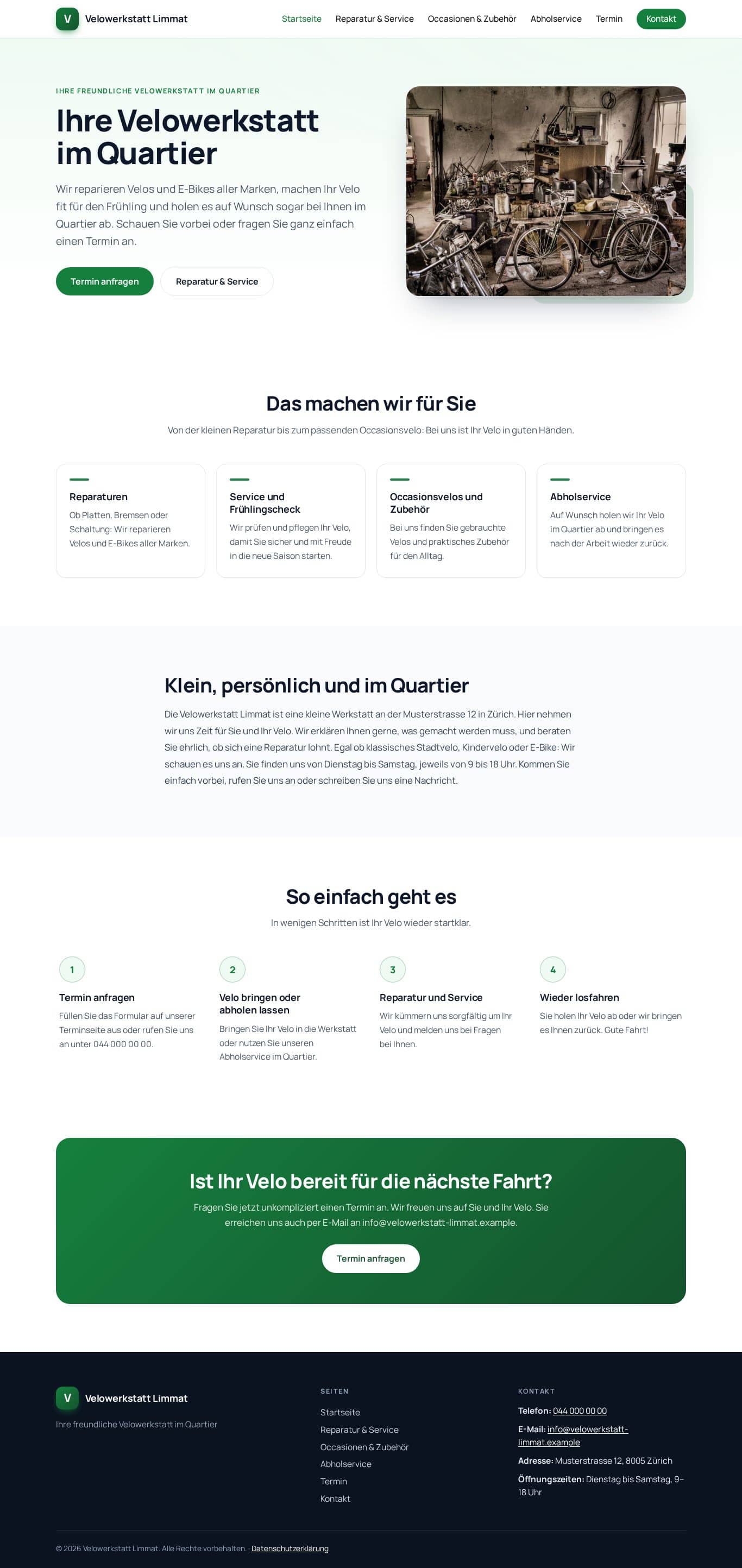
“Velowerkstatt Limmat” is a fictional bicycle workshop in Zurich. The demo shows what the assistant creates from five answers. Scroll inside the two windows to see the whole page.

Demo website “Velowerkstatt Limmat”: desktop view

Desktop

Demo website “Velowerkstatt Limmat”: smartphone view

Smartphone

Step by step

What the assistant looks like

Screenshots from the WordPress dashboard, with the German interface. Click an image to open it at full size.

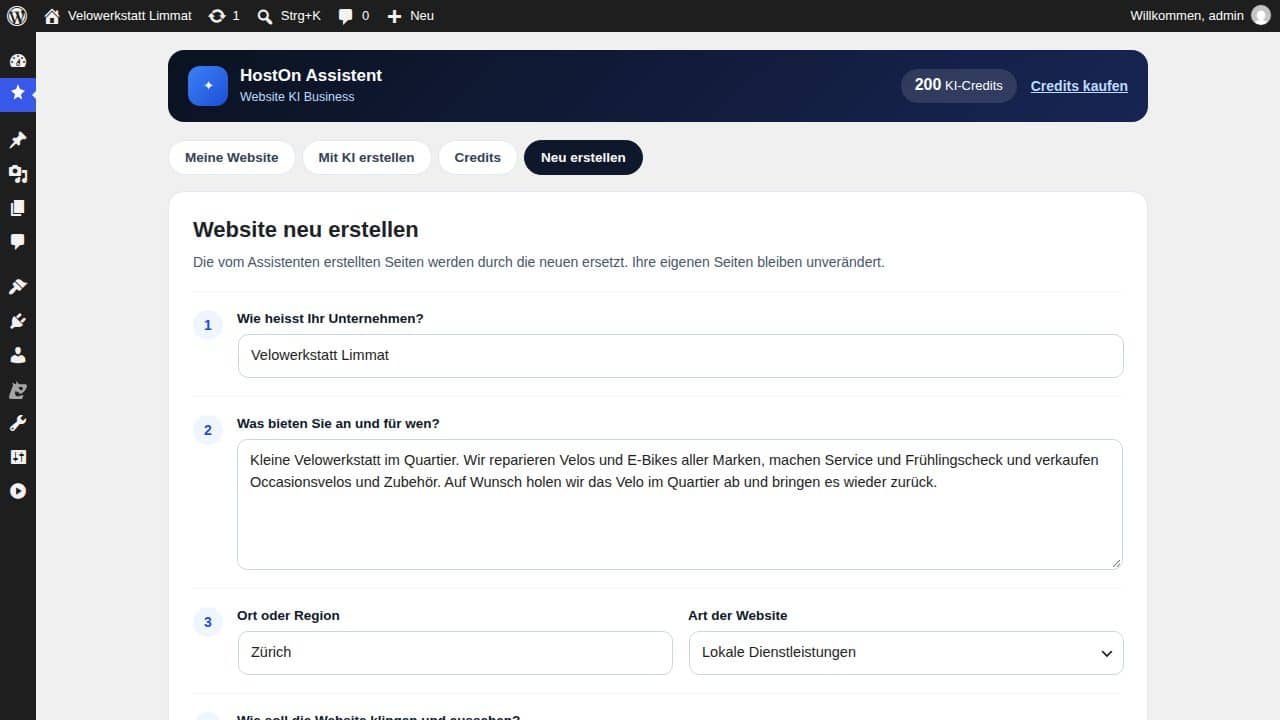
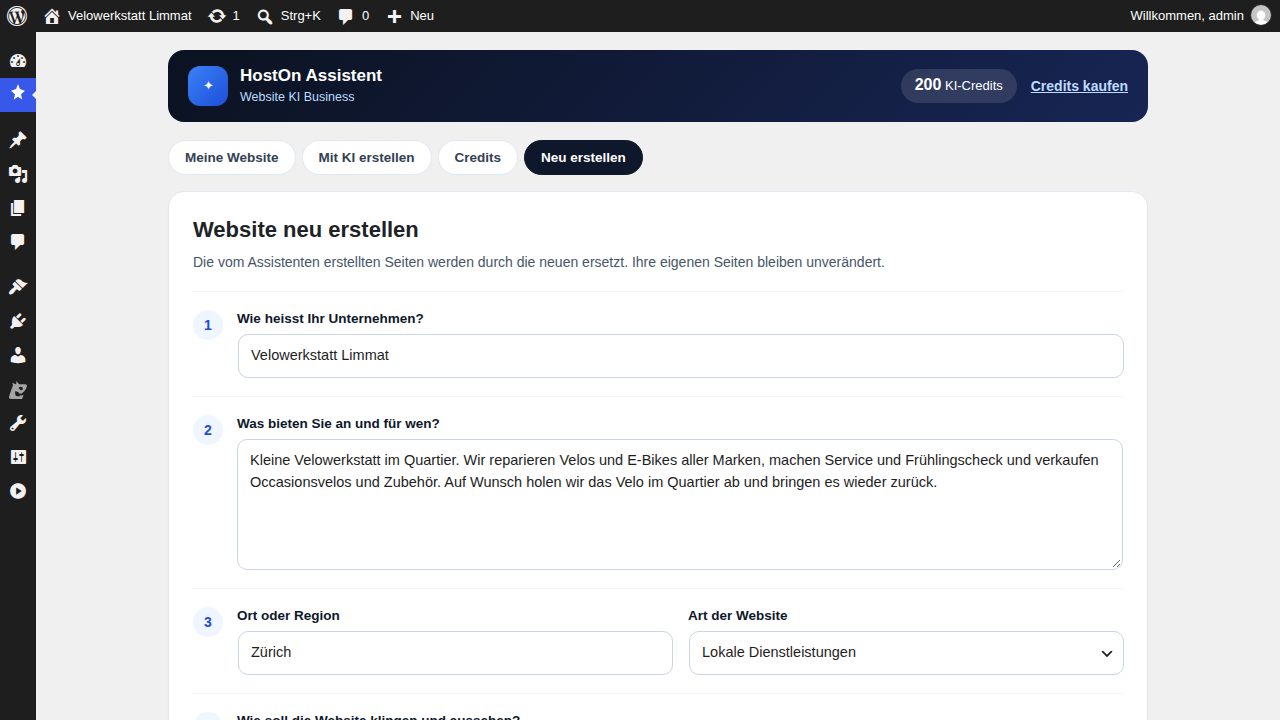
  1. The five questions
    Step 1

    The five questions

    You describe your business in your own words: name, what you offer, town or region, type of website and tone.

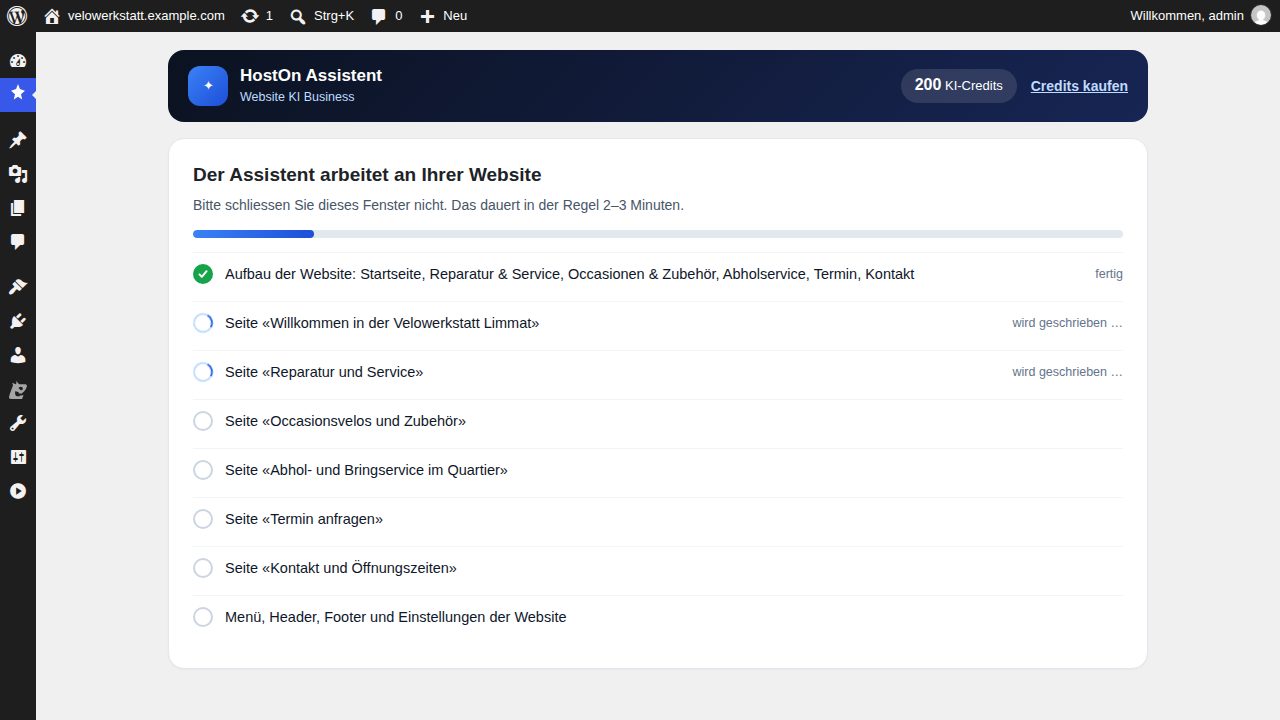
  2. Structure and pages
    Step 2

    Structure and pages

    The assistant first sets the structure of the website and then writes page by page. You see what is finished and what is still to come.

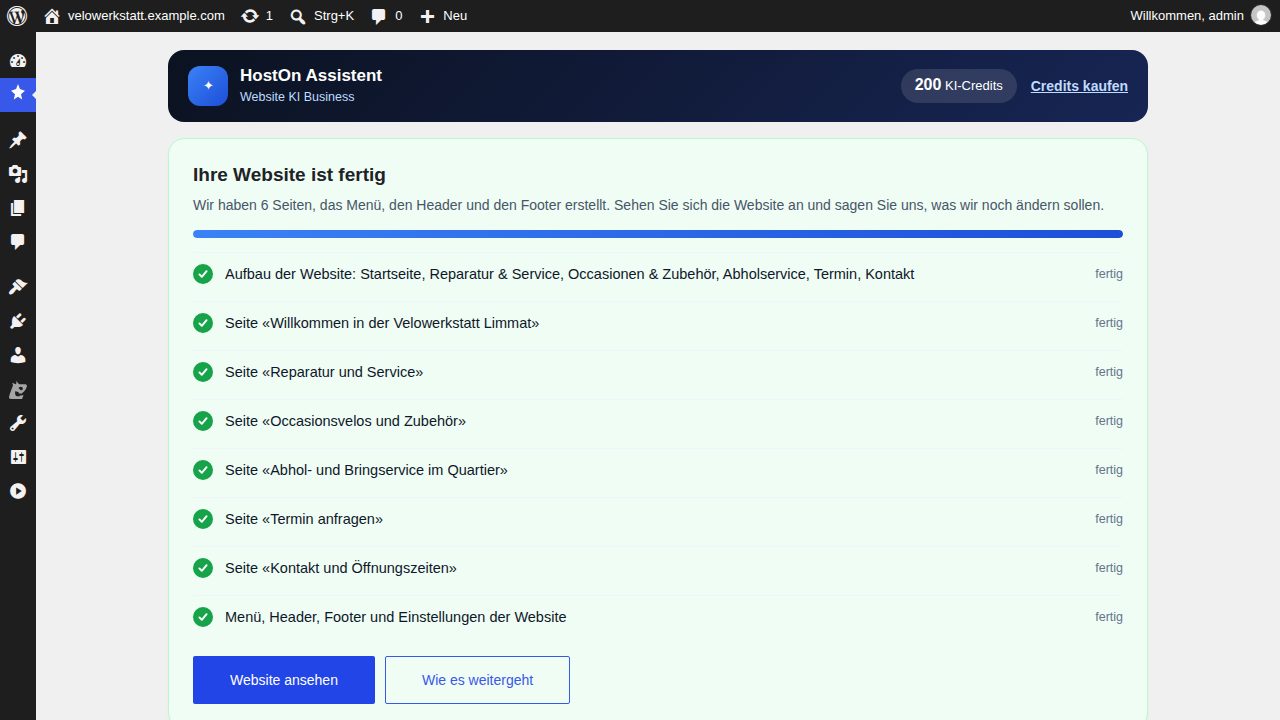
  3. The website is ready
    Step 3

    The website is ready

    Pages, menu, header and footer have been created. From here you go on to view the website.

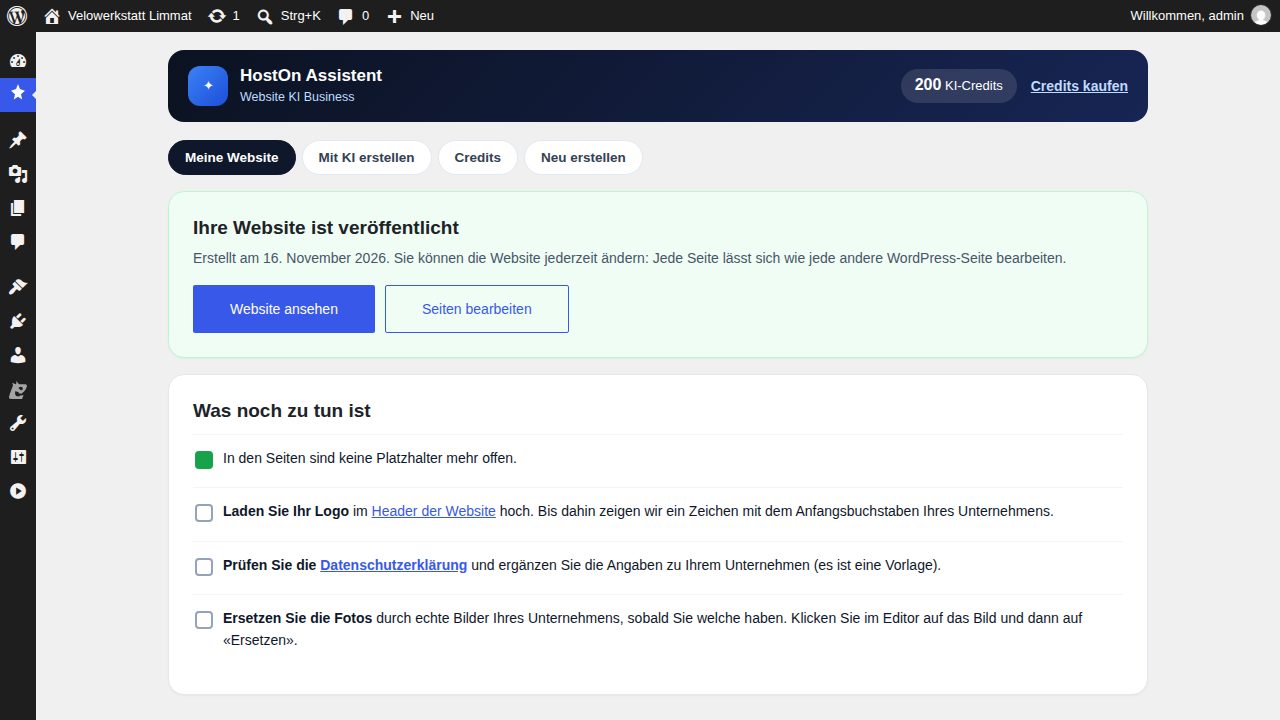
  4. What is left to do
    Step 4

    What is left to do

    A short list: upload your logo, check the privacy policy and replace the photos with your own images.

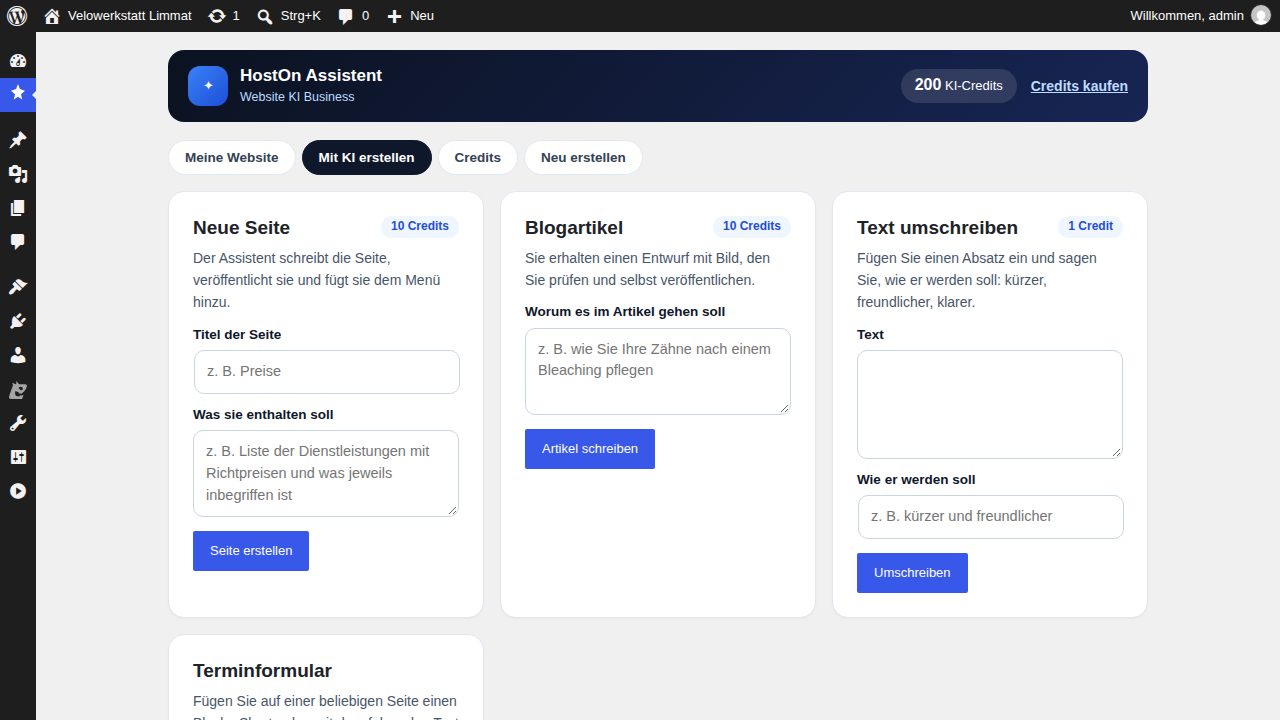
  5. Tools for later
    Step 5

    Tools for later

    New page, blog article or text rewrite – each tool shows how many credits it costs.

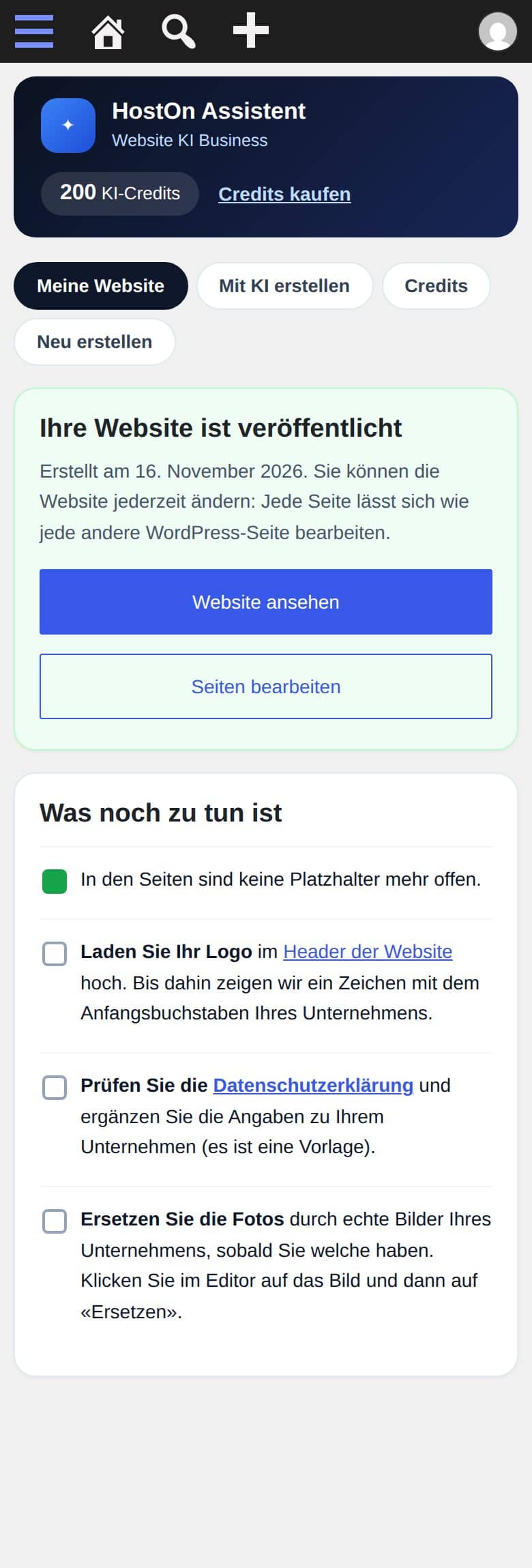
The assistant on a smartphone

You can also open the assistant on a smartphone. The picture shows the “My website” overview with the list of open points.

See the plans

HostOn Assistant in the WordPress dashboard on a smartphone

Assistant on a smartphone

What you get

A whole website, not just one page

  • Pages and texts

    A complete website of 4 to 6 pages. The texts are written from your five answers.

  • Photos

    Stock photos without people, which you can replace with your own images at any time.

  • Menu

    The menu with the pages created is set up at the same time.

  • Contact form

    A contact form is part of every plan; from Business upwards there is also an appointment request form.

  • Privacy page

    The assistant creates a privacy page. Check the text and add your details.

  • SEO basics

    Basic SEO settings for the pages created.

Everything the assistant creates consists of ordinary WordPress blocks. You can change every text and every image, and add or delete pages.

AI credits

What a task for the assistant costs

Every plan includes credits per month. They are used when you give the assistant a task.

Credits per task

  • Complete websitePages, texts, photos and menu from your five answers.100 credits
  • New pageOne more page for your website.10 credits
  • Blog articleFrom Website AI Business upwards.10 credits
  • Product descriptionFor the shop in Website AI Shop.2 credits
  • Text rewriteAn existing text is reworded.1 credit

Credits in the plan

  • Website AI Start50 per month + 100 to start
  • Website AI Business200 per month
  • Website AI Shop400 per month

The monthly credits renew every month and do not accumulate.

Extra credits

incl. 8.1 % VAT

  • 100 creditsCHF 4.90
  • 300 creditsCHF 12.90
  • 1,000 creditsCHF 34.90

You buy extra credits in the client area once you have a Website AI plan. They are valid for 12 months from the last purchase.

Plans

Website AI: plans and prices

Hosting, WordPress and assistant in one plan, billed annually.

Website AI Start

For a business’s first website

CHF13.90/ per month

billed annually: CHF 166.80annually: CHF 166.80annually CHF 166.80 · incl. VAT

50 AI credits per month + 100 to start

Order now
  • Complete website of 4 to 6 pages, written by the assistant
  • New pages and text rewrites with AI
  • Contact form and privacy page
  • Free SSL and daily backups
  • 1 WordPress website, 40 GB NVMe SSD
  • 2 GB RAM, 1.5 vCPU
Popular

Website AI Business

For businesses that publish regularly

CHF19.90/ per month

billed annually: CHF 238.80annually: CHF 238.80annually CHF 238.80 · incl. VAT

200 AI credits per month

Order now
  • Everything in Start
  • Blog articles written by the assistant
  • Appointment request form
  • Staging
  • 5 WordPress websites, 100 GB NVMe SSD
  • 4 GB RAM, 2 vCPU

Website AI Shop

For selling in your own online shop

CHF27.90/ per month

billed annually: CHF 334.80annually: CHF 334.80annually CHF 334.80 · incl. VAT

400 AI credits per month

Order now
  • Everything in Business
  • WooCommerce installed and set up in CHF
  • Product descriptions written by the assistant
  • 10 WordPress websites, 250 GB NVMe SSD
  • 8 GB RAM, 4 vCPU

All prices in CHF incl. 8.1 % VAT

The resources match the plans WordPress Säntis, Titlis and Matterhorn. WordPress hosting without the assistant · Website builder

Comparison

Website AI or the website builder?

ComparisonWebsite AIWebsite builder
Who writes the textsThe HostOn Assistant, from your answersYou, in a template
TechnologyWordPressSitejet Builder in cPanel
EditingWith ordinary WordPress blocksWith drag and drop directly on the page
Pricefrom CHF 13.90 per month, billed annuallyfrom CHF 11.90 per month, billed annually
Suitable ifyou want to start quickly with finished textsyou have your texts and want to design it yourself
Questions
HostOn

Frequently asked questions

Can’t find your question? Write to us – we usually reply the same working day.

Website AI is a WordPress hosting plan from HostOn with an AI assistant. From five answers about your business, the HostOn Assistant creates a complete website with pages, texts, photos, menu, contact form, privacy page and basic SEO settings.

Website AI Start costs CHF 166.80 per year (equals CHF 13.90 per month), Business CHF 238.80 per year (CHF 19.90 per month) and Shop CHF 334.80 per year (CHF 27.90 per month). Prices include VAT and are billed annually.

Every task for the assistant costs credits: a complete website 100, a new page 10, a blog article 10, a product description 2 and a text rewrite 1 credit. Start includes 50 credits per month and 100 starting credits, Business 200 and Shop 400 credits per month. The monthly credits renew every month and do not accumulate.

You wait for next month’s credits or buy extra credits in the client area: 100 credits for CHF 4.90, 300 for CHF 12.90 or 1,000 for CHF 34.90, including VAT. Extra credits are valid for 12 months from the last purchase and are available only with a Website AI plan.

Yes. Everything the assistant creates consists of ordinary WordPress blocks. You change texts and images directly in WordPress and can also have the assistant write further pages.

In German, French, Italian and English. WordPress itself is installed automatically in your language after payment.

In the client area with one click, with no extra login, or directly in the WordPress dashboard.

The assistant uses stock photos without people. You can replace any image with one of your own.

Questions? Write to us in your language.

We reply in the language you write in – German, French, Italian, English and two more.

DEENFRITESRO

Usually answered on the same working day

Workstations with headsets and laptops in a bright office
  • Ticketrecommended

    For anything about your account: hosting, domains, invoices. With history and attachments.

    Open a ticket
  • Email

    For questions before you order and for quotes.

    support@hoston.ch

    Send an email
  • WhatsApp

    For short questions. Please don't send passwords or customer data.

    Send a message

Check first: is there an ongoing incident?

status.hoston.ch

Contact · Migration service · Tools